
Administrative bulletin: 2026-01-001 Updates and new information
Date: January 1, 2026
Topics covered in this administrative bulletin are applicable to:
Professional and facility Providers
- CapBlueCross.com launches new, improved Provider website.
- Capital Blue Cross 2026 Provider Manual – Now available online.
- Coming soon – Appeals and medical records submissions through Capital’s Provider Portal.
- Ensuring Continuity of Care when patients change health plans.
- Evolent – High-tech radiology, cardiac imaging, and radiation oncology- Annual review of delegated services and medical policy criteria.
- Preventive services health coverage guidelines — 2026 updates.
- Shared Administrative Services Expansion – I.B. Abel, Inc.
- Services not provided directly to members are not covered – H0032.
- Single source preauthorization list updates.
- TurningPoint (TP) – Musculoskeletal (MSK) procedure code substitutions for orthopedic surgeries.
Facility Providers only
Professional Providers only
- 2026 Commercial and Medicare gaps in care measures.
- Fee schedule on Provider Portal – Now accessible to chiropractors.
- Chiropractic coding – Reimbursement policy and claims editing system updates.
Unless otherwise noted, if you have any questions regarding the information in this bulletin, please contact your Provider Engagement Consultant or visit capbluecross.com/wps/portal/cap/provider/pec-look-up and enter your NPI or Tax ID to identify your designated point of contact at Capital Blue Cross.
Professional and facility Providers
CapBlueCross.com launches new, improved Provider website
- CHIP
- EPO
- FEP PPO
- HMO
- Medicare Advantage HMO
- POS
- PPO
- Traditional and Comprehensive
- Medicare Advantage PPO
KEY POINT: Capital Blue Cross has redesigned our Provider web page on CapBlueCross.com to make navigation faster and easier with fewer login requirements.
We’re excited to announce the launch of our new and improved Provider web page on CapBlueCross.com — redesigned with your needs in mind. This major redesign helps you save valuable time while accessing the tools and information you rely on every day.
What’s new?
Fewer login hurdles – The new web page gives users access to many items in front of the firewall, so you can get what you need with fewer sign-ins or password retrievals.
Streamlined navigation – Finding the right information is quicker than ever. Our intuitively categorized topics make browsing straightforward. Commonly used resources are now available directly from the landing page. No more digging through menus — the tools and resources you need are just a click away.
New one-click access with no login required for:
- Provider Manual.
- Claims and preauthorization tools.
- Medical policies.
- Tip sheets and tutorials (coming soon).
New landing page features:
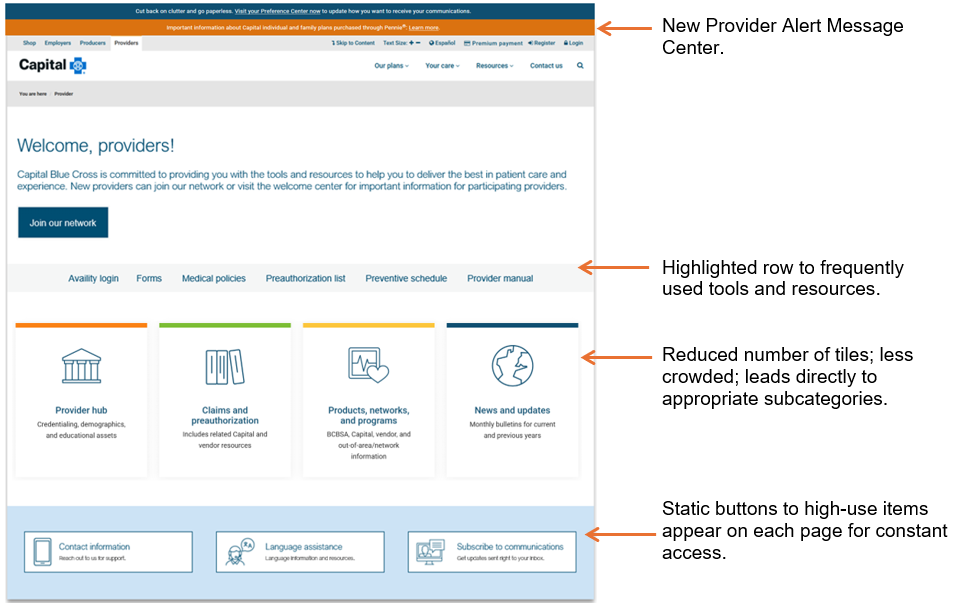
Why this matters
This update isn’t just a visual refresh — it’s a complete upgrade in user experience. By cutting down on time spent navigating and logging in, we’ll help you spend more time where it matters most: on patient care.
Access the new page at Capital Blue Cross/Providers, and start exploring today!
Capital Blue Cross 2026 Provider Manual – Now available online
- CHIP
- EPO
- FEP PPO
- HMO
- Medicare Advantage HMO
- POS
- PPO
- Traditional and Comprehensive
- Medicare Advantage PPO
KEY POINT: The Capital Blue Cross 2026 Provider Manual has been released and is now accessible in a new online location.
Capital’s Provider Manual remains an essential resource for network Providers, offering the most up-to-date information to support your practice.
2026 Updates include:
- New location – Access the manual quickly through Capital’s new Provider web page — no login required.
- Improved navigation – Scroll through the clickable index on the left-hand side of the screen to jump directly to specific chapters or units.
- Mobile-friendly design – The responsive web-based format adapts seamlessly to desktops, tablets, and smartphones, making it easy to reference the manual wherever you are.
Coming soon – Appeals and medical records submissions through Capital’s Provider Portal
- CHIP
- EPO
- FEP PPO
- HMO
- Medicare Advantage HMO
- POS
- PPO
- Traditional and Comprehensive
- Medicare Advantage PPO
KEY POINT: Implementation of the new electronic appeals functionality is on target to launch in the 1st Quarter of 2026.
As previously communicated, Capital will begin to accept appeals and associated medical records through Capital’s Provider portal (Availity Essentials), streamlining the submission process and improving electronic transactions between Capital and Providers.
What this means for you:
- Simplified submission of appeals and supporting documentation.
- Faster processing and improved tracking of submitted materials.
- Enhanced Provider engagement through a more efficient and secure platform.
We will provide additional details, including training resources and timelines, as we approach the launch date. Our goal is to ensure a smooth transition and continued collaboration with our Provider community.
By adding the appeal feature, it will help Providers:
- Improve appeal response times by enabling the submission of all required information upfront, allowing for fewer missing documents and avoiding technical issues such as broken faxes.
- By reducing the need to submit inquiries regarding the status of the appeal.
- By reducing the number of dismissed appeals returned for lack of correct forms.
Ensuring Continuity of Care when patients change health plans
- CHIP
- EPO
- FEP PPO
- HMO
- Medicare Advantage HMO
- POS
- PPO
- Traditional and Comprehensive
- Medicare Advantage PPO
KEY POINT: Effective January 1, 2026, Capital will honor preauthorizations from a member’s previous health plan for the same service, under the same type of benefit in network, for a 90-day transition period when a member changes health plans after starting treatment.
The goal is to make health care faster and simpler by improving the preauthorization process for patients and Providers. The move aligns Capital with the America’s Health Insurance Plan’s (AHIP) Continuity of Care Commitment to support the exchange of member data effective January 1, 2026.
To ensure a smooth transition of care for members who are new to Capital, Providers should submit a continuity of care request through Capital’s Provider portal (Availity Essentials). From the Authorizations and referrals screen, complete the following fields:
- Pre-approval previous plan – Yes/No.
- Date range - Enter the previous authorization date range and upload evidence of authorization.
Evolent – High-tech radiology, cardiac imaging, and radiation oncology- annual review of delegated services and medical policy criteria
- CHIP
- EPO
- FEP PPO
- HMO
- Medicare Advantage HMO
- POS
- PPO
- Traditional and Comprehensive
- Medicare Advantage PPO
KEY POINT: Effective March 1, 2026, Evolent will utilize updated medical policies in utilization management decisions for delegated High-Tech Radiology, Cardiac Imaging, and Radiation Oncology services.
Evolent’s medical policies and the delegated list of services have been reviewed and approved by Capital committees. The following medical policy updates will apply effective March 1, 2026.
Effective March 1, 2026 |
|
|---|---|
Evolent commercial policy updates |
|
|
|
Effective March 1, 2026 |
|
|---|---|
Evolent commercial and Medicare Advantage policy updates |
|
|
|
Effective March 1, 2026 |
|
|---|---|
Evolent commercial and Medicare Advantage policy retirement |
|
|
CG-104 Computed Tomography (CT) Multiplanar Reconstruction (3D Rendering) |
|
A link to Evolent's medical policies is available on Capital's Medical Policies web page. A complete list of CPT/HCPCS codes requiring preauthorization can be found on Capital's Single Source Preauthorization List.
Preventive Services Health Coverage Guidelines — 2026 Updates
- CHIP
- EPO
- FEP PPO
- HMO
- Medicare Advantage HMO
- POS
- PPO
- Traditional and Comprehensive
- Medicare Advantage PPO
KEY POINT: Effective January 1, 2026, updates have been made to the Preventive Services Health Coverage Guidelines. See the chart below for updates.
The January 2026 guidelines were updated to include the following information:
Preventive Services |
Action |
Highlights |
|---|---|---|
|
BRCA1/BRCA2 Genetic testing |
Revised |
Revised diagnosis codes to include Z85.4A. |
|
Breast cancer screening – MRI of breast |
Revised |
|
|
Breast cancer screening – Ultrasound of breast |
Revised |
Revised comment: One (1) additional MRI and/or ultrasound for women at average risk for breast cancer. |
|
Breast cancer screening – Pathology evaluation |
New |
Recommended procedure codes:
Recommended diagnosis codes: N60.21, N60.22, N60.81, N60.82, Q85.82, Q87.89, R92.2, R92.30, R92.311, R92.312, R92.313, R92.321, R92.322, R92.323, R92.331, R92.332, R92.333, R92.341, R92.342, R92.343, Z12.31, Z12.39, Z15.01, Z80.3, Z85.3, Z86.000, Z92.3 Added comment: NOTE: Genetic testing requires preauthorization. |
|
Breast cancer screening – Patient navigation services |
New |
|
|
Cervical cancer screening – Patient navigation services |
New |
|
|
Chlamydia screening |
Revised |
|
|
Computed Tomographic (CT) colonography |
Revised |
Removed comment: CT requires preauthorization. |
|
Gonorrhea screening |
Revised |
|
|
Hearing screening |
Revised |
Revised diagnosis codes to include Z00.110 and Z00.111. |
|
Hepatitis B screening |
Revised |
|
|
Hepatitis C screening |
Revised |
|
|
Human Immunodeficiency Virus (HIV) Preexposure Prevention (PrEP) |
New |
|
|
Immunizations |
Revised |
Revised administration procedure codes to include 90481. |
|
Immunization counseling by physician (not administered by Provider on same day of service) |
New |
|
|
Lipid disorder/Dyslipidemia screening |
Revised |
Revised diagnosis codes to include Z29.81. |
|
Syphilis screening |
Revised |
|
Providers are reminded to reference the Preventive Services Health Coverage Guidelines located under “Education and manuals” in the Provider Library in our Provider web portal to ensure preventive services for members are covered with no cost-share when applicable.
Shared administrative services expansion – I.B. Abel, Inc.
- CHIP
- EPO
- FEP PPO
- HMO
- Medicare Advantage HMO
- POS
- PPO
- Traditional and Comprehensive
- Medicare Advantage PPO
KEY POINT: Effective January 1, 2026, I.B. Abel Inc. joined Capital’s Shared Administrative Services arrangement with The Loomis Company. Please ensure that I.B. Abel Inc. group members have provided you with new ID cards for services.
The Loomis Company will provide benefit administration services as well as manage preauthorization and apply medical policies for members in these groups, including Behavioral Health. Providers can also visit and register at https://www.loomisco.com/healthxgateway/Provider/. If unable to register, staff should call 800.346.1223 for assistance.
How to verify member eligibility and benefits
Members will receive new co-branded ID cards displaying their employer’s logo along with Capital’s logo. Please note that the alpha prefix is “SAS”. The ID starts with the letter B, but this B is not part of the alpha prefix. Claims will need to be submitted with the full member ID of “SASB XXXXXXXX.”
I.B. Abel Inc. member ID card (sample)
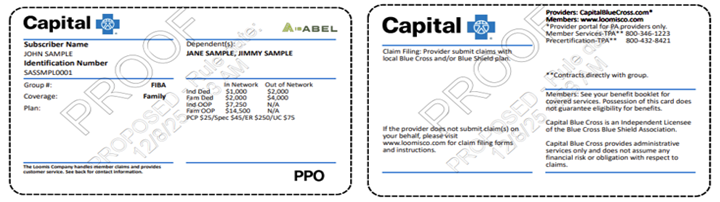
The contact information on the back of the ID card will direct members and Providers to The Loomis Company for benefit administration questions, medical policies, or issues.
Verification of Eligibility and Benefits can be done through the Capital Blue Cross Provider Portal (instructions below) or by contacting The Loomis Company at 866.203.3931.
Capital Blue Cross Provider portal:
- Log in to Availity Essentials.
- Use the Patient Registration tab on the home page and select Eligibility and Benefits.
- Under Organization, select Capital Blue Cross.
- Under Payer, select Other Blue Plans – Capital Blue Cross. (The same selection used for BlueCard® members).
- Under Provider Information, select the appropriate Provider from the drop-down menu.
- Under Patient Information, in the Patient Search Option, select ‘Patient ID, Patient Last Name, Patient First Name, Date of Birth’ from the dropdown. Then complete all required fields. See below. Be sure to include the three-character prefix at the beginning of the ID (no spaces).
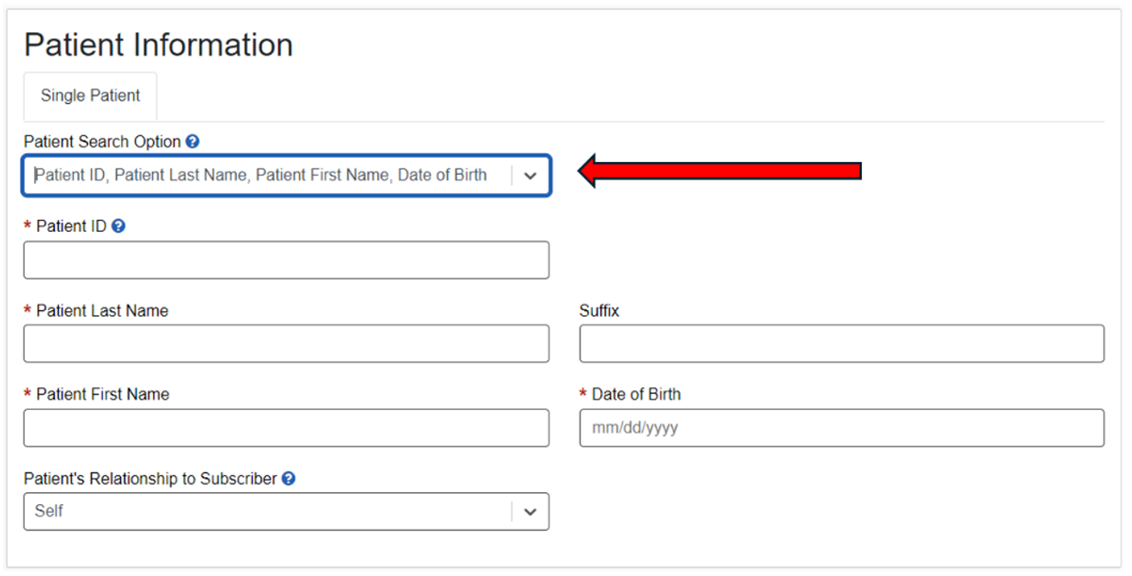
Contact the Loomis Company directly if:
- The Member Status displays - ‘Coverage Unknown’.
- The payer note indicates - ‘For eligibility and benefits, reference back of member ID card’. (Example below).
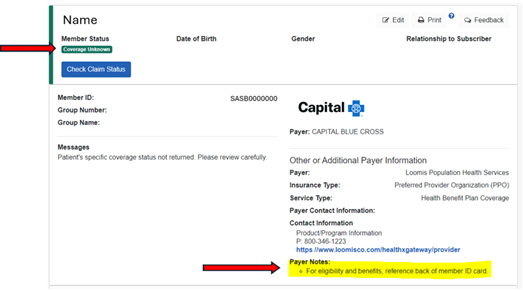
Preauthorization
Providers should contact The Loomis Company at 800.432.8421 or visit https://www.loomisco.com/healthxgateway/Provider/ for preauthorization.
Claims and payment
Claims and payment inquiries can be directed to Capital using our existing tools and procedures. Claims should continue to be submitted to Capital following our normal claims submission process. Payment for these claims is made by Capital with the regular weekly payments and will be included on the weekly SOR and 835 electronic remittance advice.
Appeals
Provider appeal rights are unchanged and should continue to be submitted to Capital.
Note: Members in these groups are not included in Capital Blue Cross’ value-based or quality programs. As such, these members will not be included in Capital’s calculations for quality improvement.
Services not provided directly to members are not covered – H0032
- CHIP
- EPO
- FEP PPO
- HMO
- Medicare Advantage HMO
- POS
- PPO
- Traditional and Comprehensive
- Medicare Advantage PPO
KEY POINT: Effective March 1, 2026, the following code, H0032, will be denied, as service is not provided directly to the members.
H0032 represents the development of a treatment plan; however, the service is performed by someone other than the physician without the member present. As a reminder, such services are non-covered and not reimbursable per our Provider agreements and Provider manual. If you are currently rendering this service, please be aware that this is a non-covered service and will no longer be reimbursed, and Network Providers are disallowed from billing the member.
Note: If the service being rendered has a more appropriate American Medical Association (AMA) CPT code, Providers are encouraged to bill the appropriate CPT code and no longer submit claims using the HCPCS code noted above.
Please remember to always verify all member benefits at the time of service and check the ID card for applicable copays and deductibles.
Single source preauthorization list updates
- CHIP
- EPO
- FEP PPO
- HMO
- Medicare Advantage HMO
- POS
- PPO
- Traditional and Comprehensive
- Medicare Advantage PPO
KEY POINT: Updates to the Single Source preauthorization list will occur as described below.
Effective February 1, 2026, the following procedure codes will not require preauthorization for Commercial and Medicare Advantage.
Codes |
|||
|---|---|---|---|
|
C1605 C1721 C1722 C1764 C1777 C1779 C1785 |
C1786 C1874 C1875 C1876 C1877 C1880 C1882 |
C1895 C1896 C1898 C1899 C1900 C2617 C2619 |
C2620 C2621 C2623 C2625 |
Effective March 1, 2026, the following procedure codes will require preauthorization for Commercial and Medicare Advantage.
Codes |
||||
|---|---|---|---|---|
|
20930 20931 20936 20937 20938 20985 22100 22101 22102 22103 22110 22112 22114 |
22116 22206 22207 22208 22210 22212 22214 22216 22325 22326 22327 22328 22840 |
22841 22845 22846 22847 22848 22850 22852 22853 22854 22855 22859 23430 29826 |
0098T 0164T G0289 20939 22842 22843 22844 61783 27331 27332 27333 27599 C1062 |
62380 23700 24300 27275 27860 22505 G0428 29892 0707T 27282 0656T 0657T |
Note: Codes that require preauthorization are maintained on the Capital Blue Cross Single Source Preauthorization List located on Capital’s Provider web page.
TurningPoint (TP) – Musculoskeletal (MSK) procedure code substitutions for orthopedic surgeries
- CHIP
- EPO
- FEP PPO
- HMO
- Medicare Advantage HMO
- POS
- PPO
- Traditional and Comprehensive
- Medicare Advantage PPO
KEY POINT: Effective February 1, 2026, Capital will accept substitute codes for a limited group of MSK procedures when authorized by TurningPoint.
In some cases, the specific orthopedic procedure required may not be known before surgery, or the surgical plan may need to change during the procedure. When this occurs, the procedure code authorized by TurningPoint may not match the procedure that was performed.
You will need to determine whether the code for the procedure that was performed can be substituted for the code TurningPoint authorized. If substitution is allowed, there is no need to contact TurningPoint to update the procedure coding.
Steps to follow to determine whether you can submit a claim with a substitute code:
- Determine whether the procedure code TurningPoint authorized appears in the substitution table listed below.
- If the authorized procedure code does not appear in the “Authorized procedure code” column, contact TurningPoint to update the coding following the post-service coding update process.
- If the authorized procedure code does appear in the “Authorized procedure code” column, look to the “Substitution codes” column:
- If the code for the procedure performed is listed as a substitution code, submit the claim with that code. No contact with TurningPoint is required.
- If the code for the procedure performed is not listed as a substitution code, contact TurningPoint to update the coding.
If you file a claim using a substitute procedure code, Capital will process the claim based on the code for the procedure that was performed.
If you need to contact TurningPoint to update procedure coding, complete the post-service code update form and upload it to the TurningPoint portal, fax it to TurningPoint at 717.412.1001, or call TurningPoint toll-free at 844.540.3705 or locally at 717.370.6450.
Orthopedic procedure code substitutions:
In most cases, the codes TurningPoint approved (first column) are interchangeable with the substitution codes (second column). However, prior to submitting a claim with a code other than the one TurningPoint approved, be sure to consult this table and verify that the code you plan to submit is allowed as a substitution.
Authorized procedure code |
Substitution code(s) |
|---|---|
|
23130* |
23415* |
|
23410* |
23412*, 23420*, 29827* |
|
23412* |
23410*, 23420*, 29827* |
|
23415* |
23130* |
|
23420* |
23410*, 23412*, 29827* |
|
27416* |
29866* |
|
27425* |
29873* |
|
29827* |
23410*, 23412*, 23420* |
|
29866* |
27416* |
|
29880* |
29881* |
|
29881* |
29882* |
|
29882* |
29881* |
|
29883* |
29880*, 29881*, 29882* |
|
29885* |
29887* |
|
29887* |
29885* |
*CPT Copyright 2024 American Medical Association. All rights reserved. CPT® is a registered trademark of the American Medical Association.
Disclaimer: Authorization of a procedure code through an approved substitution list does not waive the requirement for appropriate documentation or medical necessity. When a code substitution is applied—such as when Code A is authorized, and Code B is performed, Code B must be clearly documented in the operative or procedure note. Additionally, the services rendered under Code B must meet all applicable medical necessity criteria specific to that code. Failure to document or meet medical necessity requirements may result in claim denial, even if the substitution is otherwise permitted.
TurningPoint Healthcare Solutions LLC is an independent company that manages prior authorizations for musculoskeletal surgical and related procedures for Capital Blue Cross.
Facility Providers
Claims editing system - Inappropriate use of modifiers 59, XE, XP, XS, & XU
- CHIP
- EPO
- FEP PPO
- HMO
- Medicare Advantage HMO
- POS
- PPO
- Traditional and Comprehensive
- Medicare Advantage PPO
KEY POINT: Effective March 1, 2026, inappropriate use of Modifiers 59, XE, XP, XS, & XU will result in claim lines being rejected for facilities.
Capital follows nationally accepted standards, including Medicare and Medicaid Services (CMS) Guidelines as outlined in Network Policy FP-01.001 - Correct Coding and Reimbursement Methodology.
The Medicare National Correct Coding Initiative (NCCI) includes Procedure-to-Procedure (PTP) edits, which define when HCPCS or CPT codes should be reported separately. Capital Blue Cross will reject claim lines, including lines submitted with modifiers 59, XE, XP, XS & XU, when the CMS criteria to bypass an NCCI PTP relationship have not been met.
The Medicare NCCI Policy Manual provides further guidance on the proper use of PTP modifiers.
PTP modifiers include, but are not limited to:
- 59 – “Distinct Procedural Service.”
- XE – “Separate Encounter, a service that is distinct because it occurred during a separate encounter.”
- XS – “Separate Structure, a service that is distinct because it was performed on a separate organ/ structure.”
- XP – “Separate Practitioner, a service that is distinct because it was performed by a different practitioner.”
- XU – “Unusual Non-Overlapping Service, the use of a service that is distinct because it does not overlap usual components of the main service.”
Coding examples |
||
|---|---|---|
Scenario |
Correct |
Incorrect |
|
NCCI Policy Manual, Chapter 4, Section E. Arthroscopy “An NCCI PTP edit code pair consisting of 2 codes describing 2 shoulder arthroscopy procedures shall not be bypassed with an NCCI PTP-associated modifier when the 2 procedures are performed on the ipsilateral shoulder. This type of edit may be bypassed with an NCCI PTP-associated modifier only if the 2 procedures are performed on contralateral shoulders.” |
Using Modifier 59, XE, XP, XS, or XU to bypass a PTP relationship if the procedures were done on contralateral (opposite) shoulders. |
Using Modifier 59, XE, XP, XU, or XU to bypass a PTP relationship if the procedures were done on the ipsilateral (same) shoulder. |
|
NCCI Policy Manual Chapter 6, Section C. Endoscopic Services “Control of bleeding is an integral component of endoscopic procedures and is not separately reportable.” and instructs “If it is necessary to repeat an endoscopy to control bleeding at a separate patient encounter on the same date of service, the HCPCS/CPT code for endoscopy for control of bleeding is separately reportable with modifier 78.” |
Using Modifier 78 to bypass a PTP relationship if the procedures were done in separate operating sessions within the same global period. |
Using Modifier 59, XE, XP, XU, or XU to bypass a PTP relationship if the procedures were performed in the same operating session. |
Professional Providers only
2026 Commercial and Medicare gaps in care measures
- CHIP
- EPO
- FEP PPO
- HMO
- Medicare Advantage HMO
- POS
- PPO
- Traditional and Comprehensive
- Medicare Advantage PPO
KEY POINT: Below are the 2026 measures for the Commercial and Medicare Gaps in Care programs.
For those Providers eligible for the Commercial and Medicare Gaps in Care programs, the 2026 measures are included on the following page. As with our other value-based programs, to close gaps for performance year 2026, measures that can be closed via medical record submission can be submitted via Theon™ after the annual conversion in spring 2026.
Gaps in Care Program Measures |
Commercial |
Medicare |
|---|---|---|
|
Blood pressure control for patients with diabetes |
X |
|
|
Breast cancer screening |
X |
X |
|
Cervical cancer screening |
X |
|
|
Childhood immunization status – Combination #10 |
X |
|
|
Colorectal cancer screening |
X |
X |
|
Controlling high blood pressure |
X |
X |
|
Diabetes care - Eye exam |
X |
X |
|
Diabetes care – Blood sugar controlled |
|
X |
|
Follow-up after emergency department visit for people with high-risk multiple chronic conditions |
|
X |
|
Glycemic assessment for patients with diabetes - <8% |
X |
|
|
Immunizations for adolescents – Combination #2* |
X |
|
|
Kidney health evaluation for patients with diabetes |
X |
X |
|
Lead screening in children |
X |
|
|
Medication adherence – Cholesterol |
|
X |
|
Medication adherence – Diabetes medication |
|
X |
|
Medication adherence – Hypertension |
|
X |
|
Osteoporosis management screening in women who had a fracture |
|
X |
|
Statin therapy for patients with cardiovascular disease – Received therapy |
|
X |
|
Statin use for persons with diabetes* |
|
X |
|
Transitions of care – Patient engagement after inpatient discharge |
|
X |
|
Transitions of care – Medication reconciliation |
|
X |
|
Use of imaging studies for low back pain* |
X |
|
Fee schedule on Provider Portal – Now accessible to chiropractors
- CHIP
- EPO
- FEP PPO
- HMO
- Medicare Advantage HMO
- POS
- PPO
- Traditional and Comprehensive
- Medicare Advantage PPO
KEY POINT: Effective January 1, 2026, Chiropractic Providers will be able to view the standard fee schedule for all commercial members via Capital’s Provider portal (Availity Essentials).
Access the fee schedule as follows:
- Log in to Availity Essentials.
- Hover over Claims and Payments (located in the toolbar at the top of the screen) and click Fee Schedule Listing.
- Click the Fee Schedules link.
- Select a payer (i.e., Capital Blue Cross).
- Complete the information on the page:
- Under the Select a Provider (optional) drop-down, ensure that the field is populated with the Provider Group and not Individual Practitioner.
- Under Place of Service (POS), select Both to view all applicable options.
- Click the Next button.
- Enter procedure code(s) and any applicable modifier(s).
- Click Submit.
Note: “Place of Service” is defined as:
- Non-Facility – Office.
- Facility – All other places of service.
Troubleshooting:
- Clear your browser history and cache.
- Log out of Availity Essentials, then log back in after clearing your history.
- Make sure Availity Essentials and www.CapitalBlueCross.com are listed as trusted sites, so transactions aren’t blocked.
- Use Google Chrome for the best experience.
Chiropractic coding – Reimbursement policy and claims editing system updates
- CHIP
- EPO
- FEP PPO
- HMO
- Medicare Advantage HMO
- POS
- PPO
- Traditional and Comprehensive
- Medicare Advantage PPO
KEY POINT: Effective for claims processed on or after March 1, 2026, physical medicine service CPT® code 97140 will not be separately reimbursed when performed in the same anatomical region as the chiropractic manipulative treatment (CMT).
The Network Reimbursement Policy, NR-30.025 Chiropractic Services, has been updated to reflect that physical medicine service CPT® 97140 (manual therapy techniques) is considered an inherent component of Chiropractic Manipulative Treatment (CMT) when performed on the same anatomical region on the same date of service.
Therefore, CPT® 97140 is not eligible for separate reimbursement when billed with CMT for the same body region on the same day. Claims submitted in this manner will result in the denial of CPT® 97140, regardless of modifier usage.
Example:
- 98940 (CMT, cervical) + 97140 (manual therapy, cervical) → 97140 denied.
- 98940 (CMT, cervical) + 97140 (manual therapy, lumbar) → 97140 may be payable if documentation supports a different anatomical region.
Please review your billing practices to ensure compliance with this policy. When reporting both services, confirm that documentation clearly supports separate anatomical regions. Note that modifiers (e.g., 59, XS) will not override this policy when services are for the same region.