
Administrative bulletin: 2026-04-003 Reminders
Date: April 1, 2026
Topics covered in this administrative bulletin are applicable to:
Professional and facility Providers
- Prime Therapeutics (Prime) medical drug management - Preauthorization requirements for specialty injectables.
- Providers must update and certify data in CMS's National Plan and Provider Enumeration System.
- Shared administrative services expansion - I.B. Abel, Inc.
Professional Providers only
- Provider Appointment Availability Survey coming in May.
- Reminder to refer patients to in-network lab Providers.
Unless otherwise noted, if you have any questions regarding the information in this bulletin, please contact your Provider Engagement Consultant or visit capbluecross.com/wps/portal/cap/provider/pec-look-up and enter your NPI or Tax ID to identify your designated point of contact at Capital Blue Cross.
Professional and facility Providers
Prime Therapeutics (Prime) medical drug management - Preauthorization requirements for specialty injectables
- CHIP
- EPO
- FEP PPO
- HMO
- Medicare Advantage HMO
- POS
- PPO
- Traditional and Comprehensive
- Medicare Advantage PPO
KEY POINT: As of January 1, 2026, a number of injectable medications that previously did not require preauthorization under Capital Blue Cross now require one under Prime. Providers are required to obtain preauthorization for certain specialty injectables directly through Prime via www.GatewayPa.com.
Medical injectable medications requiring preauthorization to be covered under the medical benefit can be found on Capital’s Single source preauthorization list, located on Capital’s provider website. This list is updated periodically. We encourage you to review the Single source list for all injectable medications you administer to your patients.
Requesting a preauthorization:
Preauthorizations for specialty injectable medications can be submitted to Prime through www.GatewayPa.com for services administered in the following settings:
- Physician Office (POS 11)
- Patient Home (POS 12)
- Outpatient Facilities (POS 19, 22)
Viewing or accessing a preauthorization:
Rendering physicians or facilities can view existing authorizations in two ways:
- Creating an account on the Prime portal (www.GatewayPa.com) - Allows a search by member name and/or service date.
- Tracking number - Without an account, the rendering physician/facility would need the preauthorization tracking number from the ordering physician.
Providers must update and certify data in CMS's National Plan and Provider Enumeration System
- CHIP
- EPO
- FEP PPO
- HMO
- Medicare Advantage HMO
- POS
- PPO
- Traditional and Comprehensive
- Medicare Advantage PPO
KEY POINT: Please review your National Provider Identifier (NPI) data in the National Plan and Provider Enumeration System (NPPES) as soon as possible to ensure that accurate provider data is displayed.
Providers are legally required to keep their NPPES data current. Centers for Medicare & Medicaid Services (CMS) is also encouraging Medicare Advantage organizations to use NPPES as a resource for our online provider directories. By using NPPES, we can decrease the frequency by which we contact you for updated directory information and provide more reliable information to Medicare beneficiaries.
If the NPPES database is kept up-to-date by providers, our organization can rely on it as a primary data resource for our provider directories, instead of calling your office for this information.
When reviewing your provider data in NPPES, please:
- Update any inaccurate information in modifiable fields including provider name, mailing address, telephone and fax numbers, and specialty.
- Make sure to include all addresses where you practice and actively see patients, and where a patient can call and make an appointment.
- Do not include addresses where you could see a patient, but do not actively practice.
- Remove any practice locations that are no longer in use.
- Make sure to verify and update your NPI Type (Type 1 – Individual healthcare providers, including sole proprietors, and Type 2 – Organization).
- Verify your Sole Proprietor status (Yes or No). NOTE: Sole or Solo practitioners are not necessarily sole proprietors and vice versa.
- Confirm updates are accurate by certifying in NPPES.
If you have any questions pertaining to NPPES, you may reference NPPES help at NPPES.
Shared administrative services expansion - I.B. Abel, Inc
- CHIP
- EPO
- FEP PPO
- HMO
- Medicare Advantage HMO
- POS
- PPO
- Traditional and Comprehensive
- Medicare Advantage PPO
KEY POINT: Effective January 1, 2026, I.B. Abel Inc. joined Capital’s Shared Administrative Services arrangement with The Loomis Company. Please ensure that I.B. Abel Inc. group members have provided you with new ID cards for services.
The Loomis Company will provide benefit administration services as well as manage preauthorization and apply medical policies for members in these groups, including Behavioral Health. Providers can also visit and register at https://www.loomisco.com/healthxgateway/provider/. If unable to register, staff should call 800.346.1223 for assistance.
How to verify member eligibility and benefits
Members will receive new co-branded ID cards displaying their employer’s logo along with Capital’s logo. Please note that the alpha prefix is “SAS”. The ID starts with the letter B, but this B is not part of the alpha prefix. Claims will need to be submitted with the full member ID of “SASB XXXXXXXX.”
I.B. Abel Inc. member ID card (Sample)
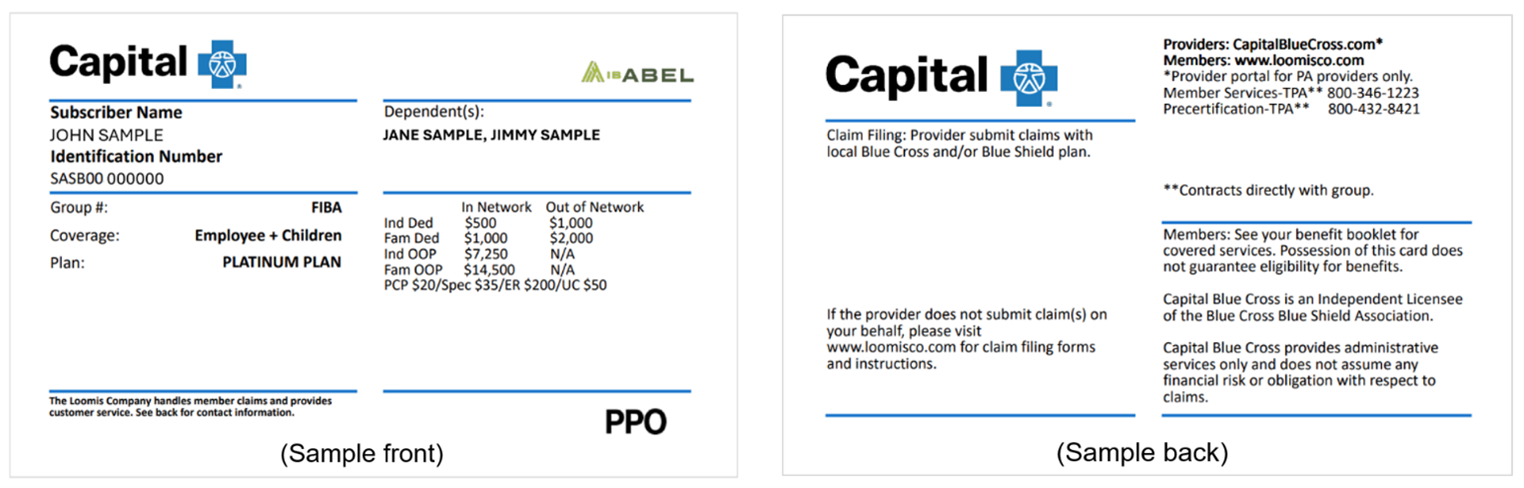
The contact information on the back of the ID card will direct members and providers to The Loomis Company for benefit administration questions, medical policies, or issues.
Verification of eligibility and benefits can be done through the Capital Blue Cross Provider Portal (instructions below) or by contacting The Loomis Company at 866.203.3931.
Capital Blue Cross Provider Portal:
- Log in to Availity Essentials.
- Use the Patient Registration tab on the home page and select Eligibility & Benefits.
- Under Organization, select Capital Blue Cross.
- Under Payer, select Other Blue Plans - Capital Blue Cross. (The same selection used for BlueCard® members).
- Under Provider Information, select the appropriate provider from the drop-down menu.
- Under Patient Information, in the Patient Search Option, select 'Patient ID, Patient Last Name, Patient First Name, Date of Birth' from the dropdown. Then complete all required fields. See below. Be sure to include the three-character prefix at the beginning of the ID (no spaces).
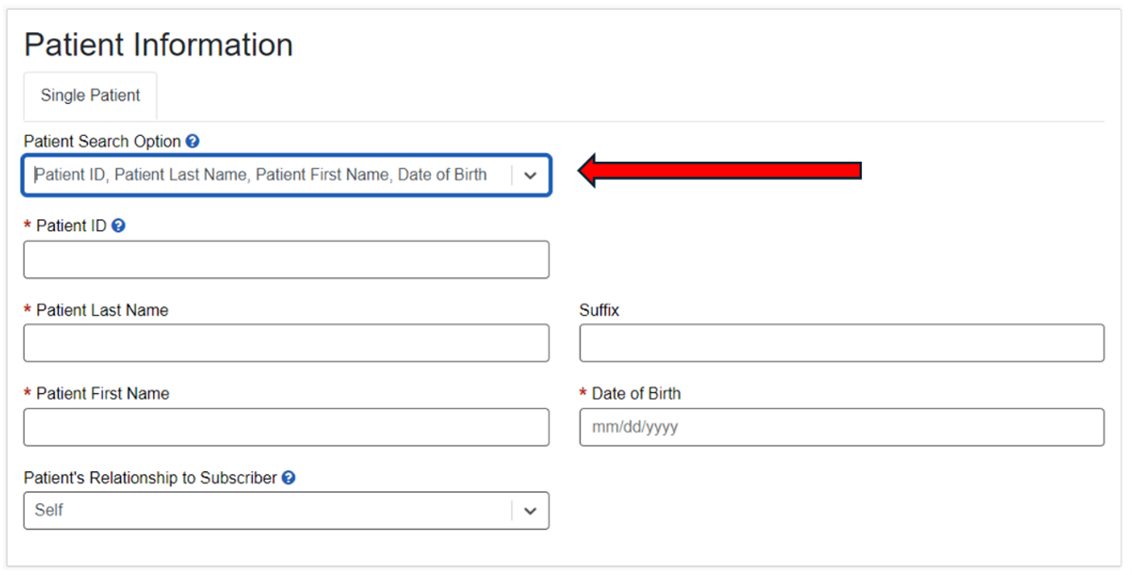
Contact the Loomis Company directly if:
- The Member Status displays - 'Coverage Unknown'.
- The payer note indicates - 'For eligibility and benefits, reference back of member ID card'. (Example below).
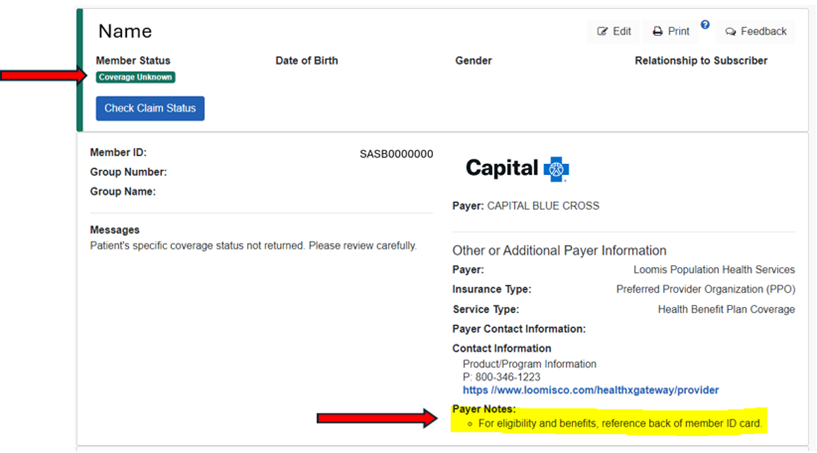
Preauthorization
Providers should contact The Loomis Company at 800.432.8421 or visit https://www.loomisco.com/healthxgateway/provider/ for preauthorization.
Claims and payment
Claims and payment inquiries can be directed to Capital using our existing tools and procedures. Claims should continue to be submitted to Capital following our normal claims submission process. Payment for these claims is made by Capital with the regular weekly payments and will be included on the weekly SOR and 835 electronic remittance advice.
Appeals
Provider appeal rights are unchanged and should continue to be submitted to Capital.
Note: Members in these groups are not included in Capital Blue Cross’ value-based or quality programs. As such, these members will not be included in Capital’s calculations for quality improvement.
Professional Providers only
Provider Appointment Availability Survey coming in May
- CHIP
- EPO
- FEP PPO
- HMO
- Medicare Advantage HMO
- POS
- PPO
- Traditional and Comprehensive
- Medicare Advantage PPO
KEY POINT: The Provider Appointment Availability Survey will be released in mid-May.
The annual Provider Appointment Availability Survey will be released in May 2026. This short survey is vital for understanding the availability of appointments offered to our members. It will be sent to PCP type providers, certain specialty providers, and professional behavioral health providers. You will receive the survey through the Availity document center and by email. You may respond using either method. In some cases, we may also conduct outreach by telephone.
Look for additional instructions, along with a complete list of provider specialties being contacted in the May Provider Bulletin. For full guidelines regarding appointment availability, please refer to Capital’s Provider Manual – Chapter 1, Unit 4, Member access to physicians and facilities.
Reminder to refer patients to in-network lab Providers
- CHIP
- EPO
- FEP PPO
- HMO
- Medicare Advantage HMO
- POS
- PPO
- Traditional and Comprehensive
- Medicare Advantage PPO
KEY POINT: When lab services are needed and cannot be provided in the provider’s office, providers must refer members to in-network laboratories.
It is important to know the BlueCard® rules, especially for members receiving services in the contiguous counties of our 21-county service area. An independent lab must submit the claim to the local plan based on location of the referring provider (ordering provider).
- If the referring provider is located within our 21-county service area, the member must be referred to an independent lab that participates with Capital Blue Cross. You can use the Capital Blue Cross MyCare Finder to find participating labs.
- If the referring provider is located outside our 21-county service area, the member must be referred to an independent laboratory that participates with the Blue Plan in the same service area as the referring provider. You can use the Capital Blue Cross MyCare Finder, which offers search capabilities nationwide.
Our service area includes the following counties: Adams, Berks, Centre, Columbia, Cumberland, Dauphin, Franklin, Fulton, Juniata, Lancaster, Lebanon, Lehigh, Mifflin, Montour, Northampton, Northumberland, Perry, Schuylkill, Snyder, Union, and York.